Optimize Every Pallet in 3D
Configure rolls and cases, visualize stacking in real time, and maximize load efficiency — all from your browser. Free to use, forever.
100% free — sign in with Google to save configurations
Why FP Pallet Optimizer
Built for real-world pallet planning
Most pallet tools treat every box the same. Ours understands rolls, cases, orientation, and the real constraints of getting product on a pallet efficiently.
Interactive 3D Pallet View
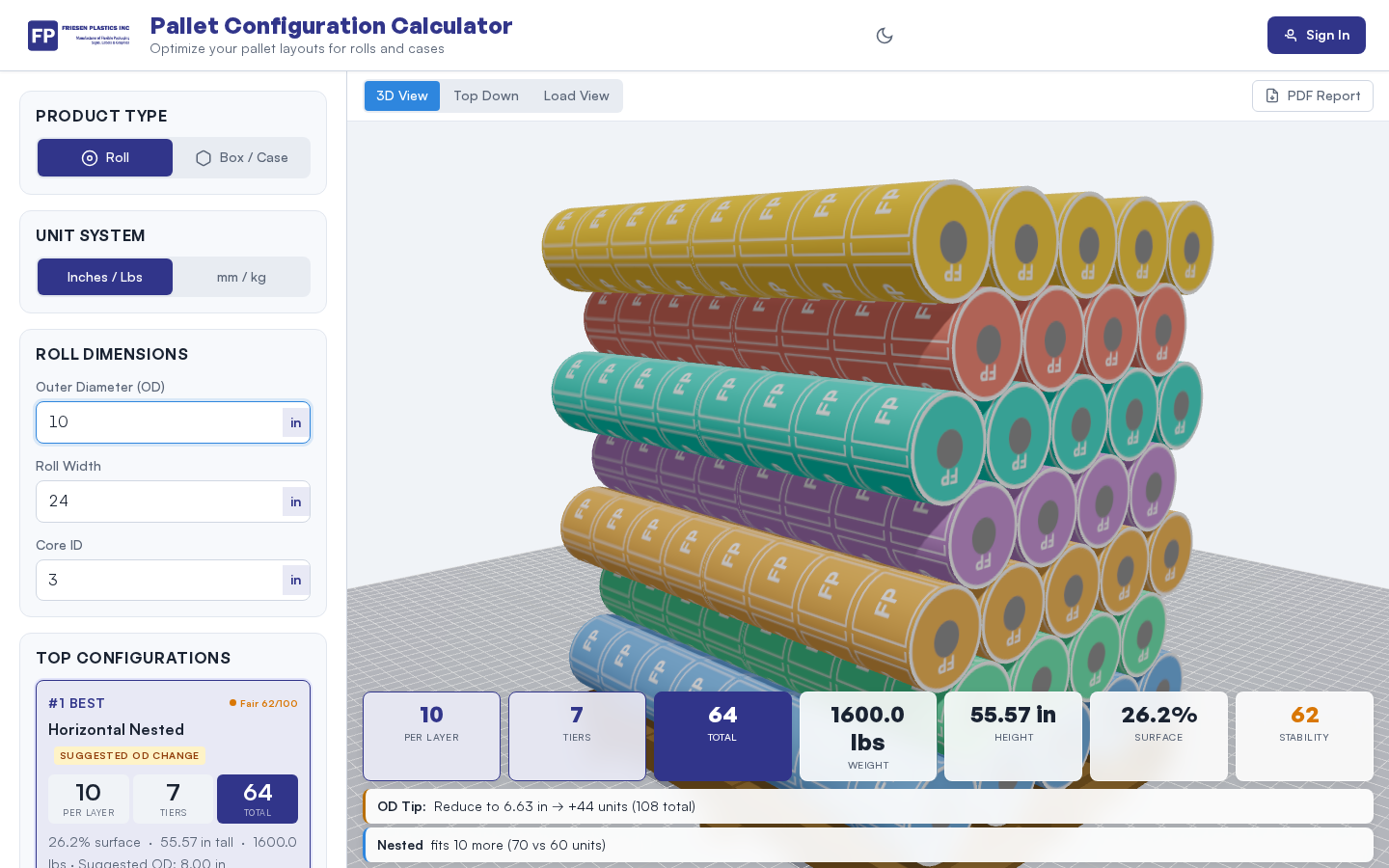
See exactly how your products stack on a pallet before a single box is placed. Rotate, zoom, and inspect your configuration from every angle.
- Real-time Three.js rendering with orbit controls
- FP-branded rolls and cases in the viewport
- Switch between pallet view and container load view
Auto-Calculate on Every Input
No submit buttons, no waiting. Change any dimension — OD, width, core ID, pallet size — and the optimizer instantly recalculates layers, tiers, and total weight.
- Immediate feedback as you type
- OD optimization suggestions (never forced)
- Horizontal and vertical roll orientation support
Single, Double & Triple Stack
Analyze whether single, double, or triple stacking maximizes your container fill. The optimizer recommends pallet height reductions to fit more into each shipment.
- Container utilization percentage per config
- Visual container load view with pallets
- Suggestions only — your specs always stay intact
Features
Everything you need for pallet planning
From roll specs to container utilization, every feature works together so you can plan, optimize, and share in one place.
Roll & Case Support
Enter OD, roll width, core ID, weight, or switch to case mode with custom L×W×H dimensions. The optimizer handles both seamlessly.
Orientation Control
Choose horizontal or vertical roll placement. The system recalculates how many fit per layer and adjusts the 3D view automatically.
Standard Pallet Sizes
Select from GMA 48×40, Euro 47.24×31.5, and other industry standards — or enter custom pallet dimensions.
OD Optimization
Get suggestions for decreasing roll OD to maximize pallet utilization without wasting space or exceeding pallet edges. Suggestions only — never overwritten.
Container Load View
Visualize how pallets fit inside standard 20', 40', and 40' HC containers. Compare single, double, and triple stack configurations.
Layer & Tier Recommendations
Automatically calculates the optimal number of cases or rolls per layer and tiers per pallet based on your dimensions and weight limits.
PDF Export
Generate a clean PDF report with pallet specs, stacking details, and configuration summary — ready to share with your team or customer.
Save Configurations
Sign in with Google to save your configurations to the cloud. Reload them anytime across devices — your setups follow you.
Admin Dashboard
Manage users, view all saved configurations, and monitor usage with a dedicated admin panel for team leads and operations managers.
How It Works
Three steps to a perfect pallet
Enter Your Specs
Input your roll or case dimensions, select a pallet size, and choose orientation. The optimizer auto-fills common defaults to save time.
Review the 3D Layout
Watch your configuration render in real time. Rotate the 3D view to inspect from every angle. Check per-layer counts, tiers, and total weight.
Optimize & Share
Apply stacking analysis, review OD suggestions, then export as PDF or save to your account for quick retrieval.
Pricing
Free for everyone. Save with sign-in.
The full optimizer is free with no limits. Sign in with Google to unlock cloud saves and cross-device access.
- 3D pallet visualization
- Roll & case calculations
- Stacking optimizer
- PDF export
- Container load view
- All free features included
- Save & name configurations
- Load saved configs on any device
- Google Sign-In (one click)
- Priority future features
FAQ